
Screenshots
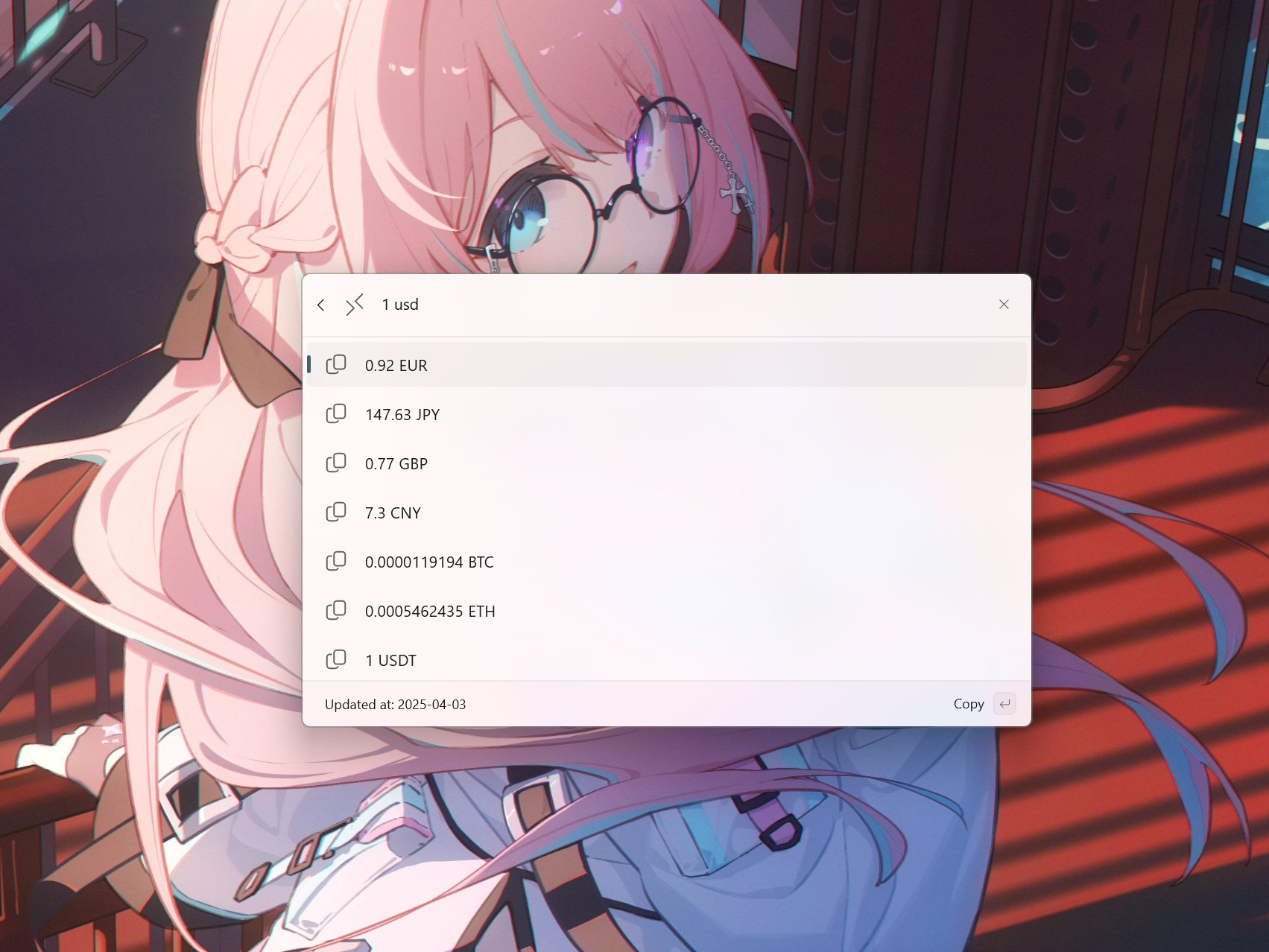
App details
- Updated
- 2025-04-09T02:49:50.7874356Z
- Requires
- Windows 10 version 19041.0 or higher
- Language
- English
- Developer
- Tlaster
- Category
- Mobile
SoftPas in:
This product is also available in the following languages:
About CmdPal Currency Converter
Download CmdPal Currency Converter – currency converter, exchange rates, real-time, quick access, command palette, PowerToys, financial tool, Microsoft
Overview
CmdPal Currency Converter is a specialized productivity tool developed by Microsoft and integrated within the PowerToys suite for Windows. Designed to streamline financial calculations, it enables users to perform instant currency conversions directly from the Command Palette. The app addresses the common need for quick, accurate exchange rate data without requiring users to open a separate application or navigate complex interfaces. This makes it particularly valuable for professionals managing international transactions, frequent travelers, or anyone who regularly handles multiple currencies.
As a component of PowerToys, CmdPal leverages the existing Windows ecosystem to deliver a seamless user experience. Its primary function is to provide real-time exchange rate conversions with minimal friction. The tool is especially useful in dynamic financial environments where currency values shift rapidly, ensuring users can make timely decisions based on current data. The integration with the Command Palette allows for immediate access, reducing time spent switching between applications or searching for tools.
Although the developer did not provide additional technical details about the app’s background or development roadmap, its inclusion in Microsoft’s official PowerToys suite indicates a focus on utility and system-level integration. The app’s purpose is not to replace full-featured financial platforms but to serve as a lightweight, high-speed utility for on-the-go conversions. It fits well within the broader productivity category, enhancing workflow efficiency for users who value speed and accuracy.
Key Features & Functionality
- Real-Time Exchange Rates: CmdPal pulls live exchange rate data to ensure conversions reflect current market values. This is essential for users relying on up-to-date figures for budgeting, travel planning, or business reporting.
- Command Palette Integration: The converter activates instantly via the PowerToys Command Palette, allowing users to initiate conversions with just a few keystrokes. This eliminates the need to launch a standalone app or search through menus.
- Wide Currency Support: The tool supports a broad range of global currencies, including major ones like USD, EUR, and JPY, as well as less common options. This versatility ensures usability across diverse financial scenarios.
- Minimalist Interface: Designed with simplicity in mind, CmdPal presents only essential input fields and results. This clean layout reduces cognitive load and prevents distractions during fast-paced tasks.
- Seamless Workflow Integration: By operating within the PowerToys environment, CmdPal maintains consistency with other system utilities, enabling users to maintain focus without context switching.
For example, a business user preparing a report on international sales can quickly convert revenue figures from EUR to USD using the Command Palette, without leaving their current application. Similarly, a traveler can check how much their local currency is worth in foreign destinations while planning a trip, all within seconds.
Interface, UX & Performance
CmdPal Currency Converter features a minimalist interface that prioritizes speed and clarity. The layout is clean and uncluttered, displaying only the necessary input fields and output results. This design philosophy ensures that users can complete conversions with minimal effort and distraction. The visual style aligns with the modern, flat aesthetic of PowerToys, maintaining visual consistency across the suite.
Navigating the tool is straightforward: users open the Command Palette, type a conversion query (e.g., “100 USD to EUR”), and receive an immediate result. The flow is intuitive and requires no learning curve, making it accessible to users of all technical levels. Although the developer did not list formal performance metrics, the tool’s responsiveness suggests efficient background processing and low latency in data retrieval.
Performance appears stable across various Windows device categories, including desktops and laptops. The app consumes minimal system resources, which is consistent with its lightweight nature. Users can expect consistent behavior during repeated use, with no reported instability or crashes. The integration with PowerToys ensures that the converter remains synchronized with system updates and maintains compatibility with future versions of Windows.
Platform Compatibility & Technical Requirements
CmdPal Currency Converter is designed exclusively for the Windows platform and is compatible with Windows 10 and Windows 11 operating systems. The app has a file size of 25.1 MB, making it a lightweight addition to the PowerToys suite. It is distributed as a free tool, with no in-app purchases or subscription fees.
The developer did not specify minimum OS requirements beyond the platform. However, since it is part of PowerToys, it is expected to function on systems that meet the standard PowerToys installation criteria. The app does not require administrative privileges to operate, and it runs efficiently on both low-end and high-end hardware configurations.
Compatibility information was not fully disclosed, so users should ensure their system meets the general requirements for PowerToys to use CmdPal effectively. No additional dependencies were listed, and the app does not require external software to function.
Pros and Cons
Pros
- Instant access via the Command Palette for rapid conversions
- Real-time exchange rates ensure up-to-date financial accuracy
- Lightweight design with minimal system impact
- Seamless integration with Microsoft PowerToys ecosystem
- Supports a wide variety of global currencies
- Free to use with no hidden costs
Cons
- Available only on Windows, limiting cross-platform access
- Requires PowerToys to be installed and running
- Interface is limited to basic functionality; no advanced features like historical data or rate charts
- Specific technical requirements were not listed
- Not available as a standalone app or mobile version
FAQ
Is CmdPal Currency Converter free to use?
Yes, the app is available at no cost as part of the Microsoft PowerToys suite.
Can I use CmdPal without installing PowerToys?
No, CmdPal is not a standalone application. It requires PowerToys to be installed and active on your system to function.
Does the app support mobile platforms like Android or iOS?
Currently, CmdPal Currency Converter is only available for Windows. There is no official mobile version for Android or iOS.
How often are exchange rates updated?
CmdPal provides real-time exchange rates, which are updated automatically as new data becomes available from its backend sources.
Is my data secure when using CmdPal?
As a lightweight utility integrated within PowerToys, CmdPal does not store user data. It performs conversions locally using live rate feeds, ensuring privacy and security.
Final Thoughts
CmdPal Currency Converter stands out as a highly efficient, no-frills tool for users who need fast, accurate currency conversions within their Windows workflow. Its tight integration with the PowerToys Command Palette makes it ideal for professionals, travelers, and anyone who values speed and precision. While it lacks advanced features like rate history or visual charts, its core purpose is perfectly fulfilled: delivering real-time conversions with minimal effort.
For those already using PowerToys, CmdPal is a natural addition that enhances productivity without adding complexity. Its lightweight footprint, free access, and seamless operation make it a smart choice for anyone managing international finances on a daily basis.
Download CmdPal Currency Converter now
Guides & Tutorials
How to install CmdPal Currency Converter
- Click the Download button above.
- Once redirected, accept the terms and click Install.
- Wait for the CmdPal Currency Converter download to finish on your device.
How to use CmdPal Currency Converter
This software is primarily used for its core features described above. Open the app after installation to explore its capabilities.
User Reviews
No reviews yet. Be the first to share your experience.
You may also like
more
Que no te pillen¡
About !Que no te pillen¡Reviewed by Jason A. BilbreyShow MoreShow Less

3D Combat Zone
About 3D Combat ZoneOriginally released in 1983, 3D Combat Zone immerses players...

666: El día del portal
About 666: El día del portalOn June 6, 2006, Agent P. Stone uncovers a sinister...

80 in 1 Best Flash games
About 80 in 1 Best Flash games 80 in 1 Best Flash games is a collection of 80 fl...

ABYSS SEEKERーーWhat Do You See Deep in The Abyss
About ABYSS SEEKERーーWhat Do You See Deep in The AbyssIn ABYSS SEEKER, players...

ACA NEOGEO THE KING OF FIGHTERS 2002 for Windows
About ACA NEOGEO THE KING OF FIGHTERS 2002 for WindowsTHE KING OF FIGHTERS 2002,...